Omea Consent · free on WordPress.org
A free WordPress cookie banner. No pageview limits.
Scripts wait for consent in their category, Google Consent Mode v2 is always on, and every choice is logged on your own site. A free cloud scan then checks from the outside what still gets set before a choice and after “Reject all”.
Live Preview opens a demo shop in your browser – the banner, two sample scripts that wait for consent and a map behind a placeholder. Nothing to install.
Free and open source (GPLv2 or later) · no account · WordPress 6.0+, PHP 7.4+
 “Reject all” as easy as “Accept all”No pageview or visitor limits
Works with
 Google Consent Mode v2
 Microsoft UET & Clarity
 HubSpot
 WooCommerce
 Polylang
 WPML
 WP Consent API
 Global Privacy Control
What you get, free
No trial and no visitor cap. Everything below is in the free plugin from WordPress.org.
12 languages, accessible
The banner, preferences and cookie policy are built in for English, Finnish, Swedish, Danish, Norwegian, Estonian, German, Dutch, French, Spanish, Italian and Polish – per page with Polylang or WPML. Built and tested for WCAG 2.2 Level AA with axe-core, keyboard and screen reader checks.
Google Consent Mode v2, always on
Every consent type is denied before any Google tag loads and updated the moment the visitor chooses. Pick Advanced (cookieless pings to Google before consent) or Basic (nothing sent to Google before consent), with optional url_passthrough. Works with gtag.js and Google Tag Manager.
Scripts wait for consent
Paste your tracking snippets under a consent category, or turn on auto-blocking to also hold known trackers that your theme and other plugins add – the Meta pixel, Google Ads, Hotjar, TikTok and LinkedIn among them – until the visitor allows them. Google tags follow your Consent Mode setting.
Embeds behind a placeholder
YouTube and Vimeo videos, Google Maps and Facebook embeds wait behind a placeholder that names the provider, with “Load once” and “Allow” buttons – no blank gap, and no cookies before consent.
A consent log on your own site
Every banner and preferences choice is stored in your WordPress database with a consent ID, time, categories and banner version – with CSV export and a retention setting. Nothing is sent to Cultmetrics.
Microsoft and HubSpot get the choice
Microsoft Advertising (UET), Clarity and the official HubSpot plugin receive the visitor’s choice automatically, also when their tags come through Tag Manager or another plugin.
US opt-out and GPC
Switch to the opt-out model for US state laws: a “Do Not Sell or Share My Personal Information” notice replaces the banner, a footer link opts out in one click, and Global Privacy Control is honoured automatically.
Cookie table and policy page
A local scan and the cloud scan fill a cookie table and an auto-updating cookie policy page – a block or a shortcode. A five-step setup wizard and a checklist spot tags and other cookie banner plugins already on your site.
What the free cloud scan shows
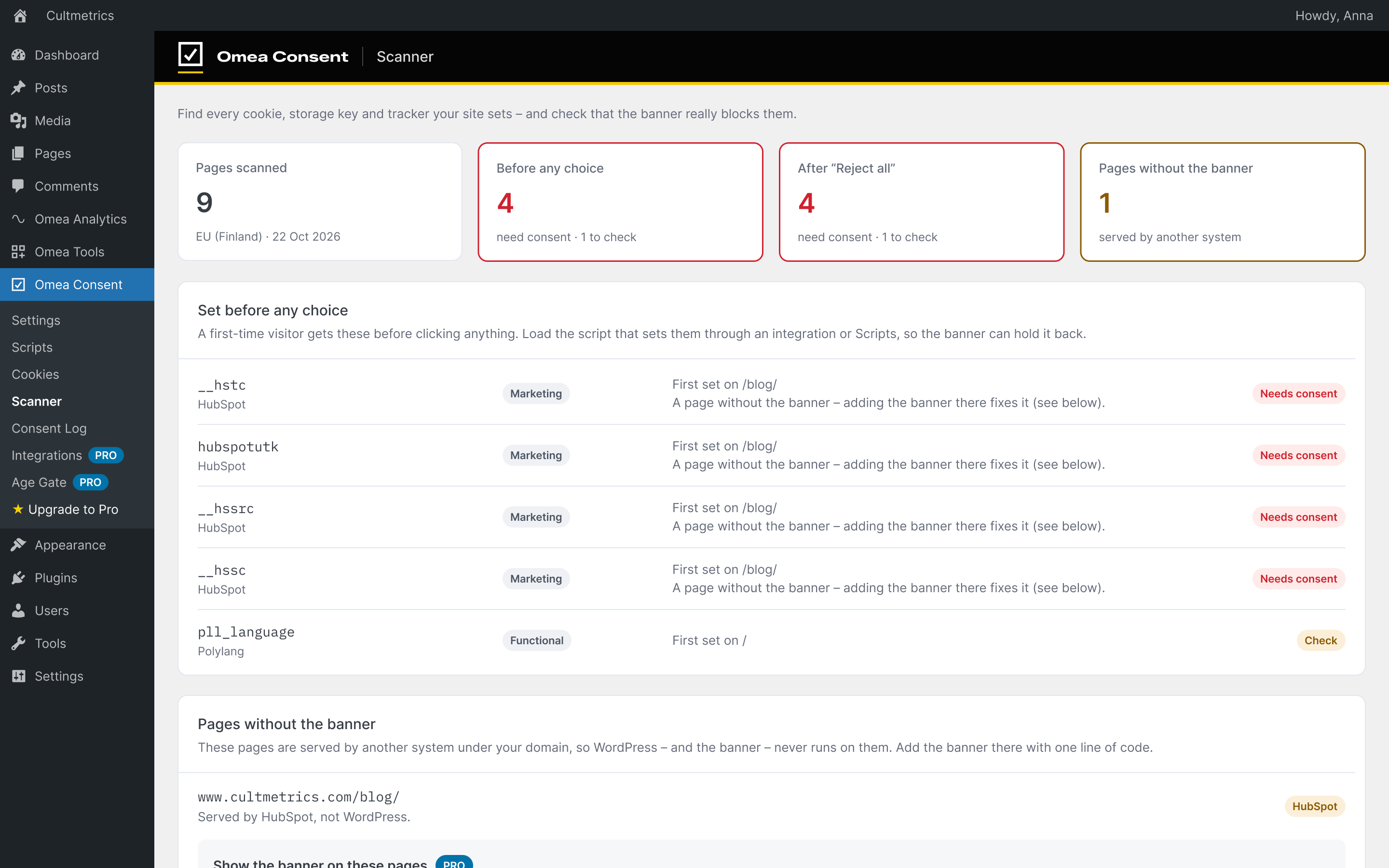
A banner can look right and still let things through. Our scanner in the EU visits up to 10 public pages of your site like a first-time visitor, in about one to two minutes, and reports:
- Cookies, storage keys and scripts set before any choice
- What is still set after “Reject all”
- What loads after “Accept all”
- Pages where the banner doesn’t run – for example a blog that another system serves under your domain
- Cookies whose purpose Omea doesn’t know yet, marked “to check”
One free scan per site. Nothing is sent until you click “Run free cloud scan”; then only your home URL, the plugin version and a one-time token go to Cultmetrics. The scanner never reads cookie values, and the result is kept for 90 days.
Want a quick look before installing? The free cookie checker loads your home page as a first-time visitor and shows what sends data before any choice – no plugin needed.
For developers
Everything runs in your WordPress. The banner, blocking and consent log make no calls to Cultmetrics or anyone else. Data leaves your site only when an administrator starts the cloud scan or turns on the optional CookieDatabase.org lookups.
- Other plugins read the visitor’s choice through the WordPress Consent API; in the browser, a
cmp:consentevent fires onwindowon page load and after each choice. - Your own script URL, cookie and storage-key rules per category (Settings › Advanced), and filters such as
omea_consent_autoblock_patternsandomea_consent_managed_scripts. - A pasted Google tag (gtag.js) can follow your Consent Mode setting: it loads at once with consent denied in Advanced mode and waits for consent in Basic mode.
[omea_consent_cookie_table]and[omea_consent_opt_out_link]shortcodes, a Cookie table block, and any link to#omea-consent-preferencesopens the cookie settings.- Export, import and reset settings – move one setup between sites.
Already in WordPress? Go to Plugins › Add New, search for “Omea Consent”, then Install and Activate. The setup wizard opens on its own. Read the docs
Need more? Omea Consent Pro
The free plugin stays complete and keeps working on its own. Omea Consent Pro is an optional paid add-on – €49 a year + VAT for one site, with a 7-day free trial – for sites that run ads:
- Tags by ID, no code: Google Analytics 4, Tag Manager, Google Ads, Meta, TikTok, Microsoft Advertising, LinkedIn and Snap
- Conversion tracking, and server-side Conversions APIs for Meta, TikTok, LinkedIn and Snap sent from WordPress – no tagging server
- Unlimited cloud scans, monthly, with an email when something new appears
- The banner on pages outside WordPress, rules per region, an age gate, a full-screen layout and custom CSS
Questions
Is Omea Consent really free? Are there limits?
Yes, and no pageview, visitor or subpage limits. The banner and preferences window, Google Consent Mode v2, script blocking and auto-blocking, embed placeholders, the consent log, the cookie scanner and policy page, the US opt-out model with Global Privacy Control and one cloud scan per site are all in the free plugin, with no time limit.
Will it make my site GDPR compliant?
No plugin can promise that. Omea Consent gives you the tools – blocking, Consent Mode, a consent log and a scan that shows what still slips through – but whether your site complies depends on how you set it up and what else it loads.
Can I use Google Analytics, Tag Manager or the Meta pixel with the free plugin?
Yes. Paste their snippet under Omea Consent › Scripts in the right category, or leave them where your theme or another plugin adds them and turn on auto-blocking. Adding tags by pasting just an ID, and sending conversions from your server, are Omea Consent Pro.
Where does the data go?
The visitor’s choice is kept in a first-party cookie, and the consent log in your own database. Nothing is sent to Cultmetrics or any third party, except the cloud scan you start yourself. Optional CookieDatabase.org lookups for cookie descriptions are off by default.
I already use another cookie plugin. Can I switch?
Yes. The setup checklist spots other cookie banner plugins and tags already on your site and tells you what to do. Run one consent plugin at a time.
Does it support IAB TCF?
No. Omea Consent doesn’t produce an IAB TCF consent string. If your ad network requires one, you need a TCF-registered consent platform.
Free on WordPress.org
See what your banner actually lets through
Install Omea Consent, follow the setup checklist, then run the free cloud scan to see what your site sets before any choice and after “Reject all”.
- No pageview, visitor or subpage limits
- Google Consent Mode v2 always on
- Consent log on your own site, with CSV export
- 12 languages built in
Free and open source (GPLv2 or later) · no account · WordPress 6.0+, PHP 7.4+
 A choice per categoryEvery choice logged on your site